In our daily lives, we lock social media, archive chats, and limit media views, but what truly keeps our information safe is using trusted tools and verified security protocols. For example, while WhatsApp has been a convenient tool for our day-to-day operations, it may not be the most secure option for sharing highly sensitive information, since users cannot easily verify the “end-to-end encryption” protocol. Many experts now recommend Signal as a more transparent, privacy-focused alternative because Signal is an open-source, free, and private messaging app that uses end-to-end encryption to guarantee maximum privacy for your text, voice, and video calls.
Exactly one month ago, such digital hacks were introduced to us when we both colleagues from DataSense, iSocial, attended a transformative two-day training on Digital Safety and Information Integrity, organized by Digitally Right at the YWCA Training Center. The training session was a wake-up call, proving that in an era of AI and constant cyber threats to personal accounts, basic life hacks have become essential for survival.
We all maintain dozens of digital accounts, but how many of us use unique, strong passwords to each? If you are still using predictable patterns, for example, “amena123456”, you might be at a high risk. During the risk assessment session, we learned that a secure password should be 14 characters long, random, and unique. To manage this without memorizing, we were introduced to reliable Password Managers, such as bitwarden.com, KeePassXC, ProtonPass in all types of digital devices. We were also encouraged to use two-factor authentication while accessing any digital platforms. The usage of public WiFi is strictly prohibited for signing into digital devices; in such cases, using a VPN can save accounts by shielding traffic comfortably.
Backup Automation software, such as, duplicati.com, cryptpad.fr were also introduced in this training session. This software helps in keeping information encrypted and out of reach of third parties.
In the case of accessing Google Services, two important features were discussed. For example, Google Drive was highlighted as risky for sending, keeping, and receiving information. A powerful alternative to that can be veracrypt.io. Additionally, instead of using Google Form, any type of form can be created using Cryptpad.fr to collect information securely and anonymously.
Many VPN services were suggested during the session for Personal Computers (PCs) and mobile phones, such as Proton VPN and Psiphon.ca. Brave and Tor browsers were suggested for safe browsing through some websites. ‘Have I been Pwned’ was suggested to check for any breach history in email and for verification.
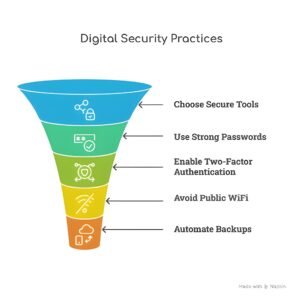
Figure 1: Enhancing Digital Security through Practices
The day ended with guidance on safely using our mobile phones. Since smartphones are almost always in our hands, they can also become one of our key security vulnerabilities if not properly protected. It is vital to secure our devices with a strong password as part of mobile security, avoiding patterns or relying solely on face recognition when privacy is a concern. Additionally, GPS location services can be turned off when they are not needed to reduce the risk of unwanted tracking and unnecessary data use.
The second day of the training started by meeting the META team virtually, who demonstrated and let participants explore various platforms related to digital presence and online safety. One of the fascinating insights derived from the session is that the reports we make against any content are seriously considered and verified by the META team for these three platforms: Facebook, WhatsApp, and Instagram. The coded statements or the veiled threats, such as F@cEb00k made against any human, organization, or any leaders, are usually easily detected by the team. The META team also showed how users can regularly keep track of account privacy by visiting “Settings” and the “Privacy” options for each social media account, as part of an audit. Furthermore, to support the 13th National Election of Bangladesh, the META team made plans to observe the voting center locations and other related information, as well as veiled threats related to candidates, so that they could undertake measures upon any reported discrepancies.
The other empirical sessions of the second day of the training consisted of methodologies for verification and fact-checking, where participants could check the image source and identify original contexts and capture screenshots to verify with different verification tools. The training emphasized one golden rule: Always trust your own observations first. To stay ahead of deceptive content and protect our natural human intuition, it is always better to check for watermarks, spelling errors, geometrical inconsistencies, and pixel counts when analyzing. Some of the tools for verifications purposes are, Reverse Image Search, Invid Plug-in, Google Lens, and You Stitch it to undertake activities, such as visual evidence check, photo verification, video or image analysis via digital devices.
To effectively identify AI-generated misinformation, users should start with high-caliber detection software, such as Hive Moderation or DeepFake-o-meter, which are designed to spot deepfakes that our human eyes may miss. For a broader check, general platforms such as, “AI or Not” can help verify the origin of suspicious media. Beyond software, users should also look for geometrical inconsistencies in images or overly repetitive patterns in written text. Finally, we should always scan for embedded watermarks from AI generators, as these are often the quickest way to confirm a file’s origin.
To stay ahead of sophisticated misinformation, digital investigators must move beyond basic queries and employ Advanced Information Retrieval Techniques. By utilizing Boolean operators, such as, AND and OR, you can create highly specific search strings that filter out digital noise. Precision is further sharpened by using Exact Match (placing phrases in “quotation marks”) to find specific claims, and Filetype Specificity (e.g., filetype:pdf) to unearth official reports or white papers that are not easily indexed. To verify a source’s credibility, Domain Filtering (using the site: operator) allows for deep-diving into specific platforms, while Time-Specific Searches enable researchers to pinpoint the exact moment a narrative first appeared, effectively tracing misinformation back to its root.
Archiving or evidence preservation is something that you must know in detail, regardless of which profession you are in. On a day-to-day basis, we always read a single piece of information for our respective purposes, and sometimes, the information turns out to be lost, changed, or manipulated. Besides, in the digital age, deleting does not always mean gone. Using tools, such as Archive.ph (or Archive.today) is particularly effective for social media platforms like Facebook, as it bypasses login walls to create a searchable, permanent record. For a more comprehensive historical view, the Wayback Machine (Archive.org) allows researchers to systematically “snapshot” entire web pages and track changes over time. For legal or academic professionals, Perma.cc provides an extra layer of security by generating unalterable, high-integrity citations that prevent “link rot,” ensuring that the evidence you cite today remains accessible and authentic for years to come.
Last but not the least, when you begin your journey into digital verification, use a secondary email for signing up for these various verification tools. This adds an extra layer of security to keep your primary inbox safe from potential tracking.
Written by Kanij Fatima Maisha and Anika Tasnim. Maisha and Anika are research professionals at DataSense – iSocial.